
组合模式 Composite Pattern
介绍
-
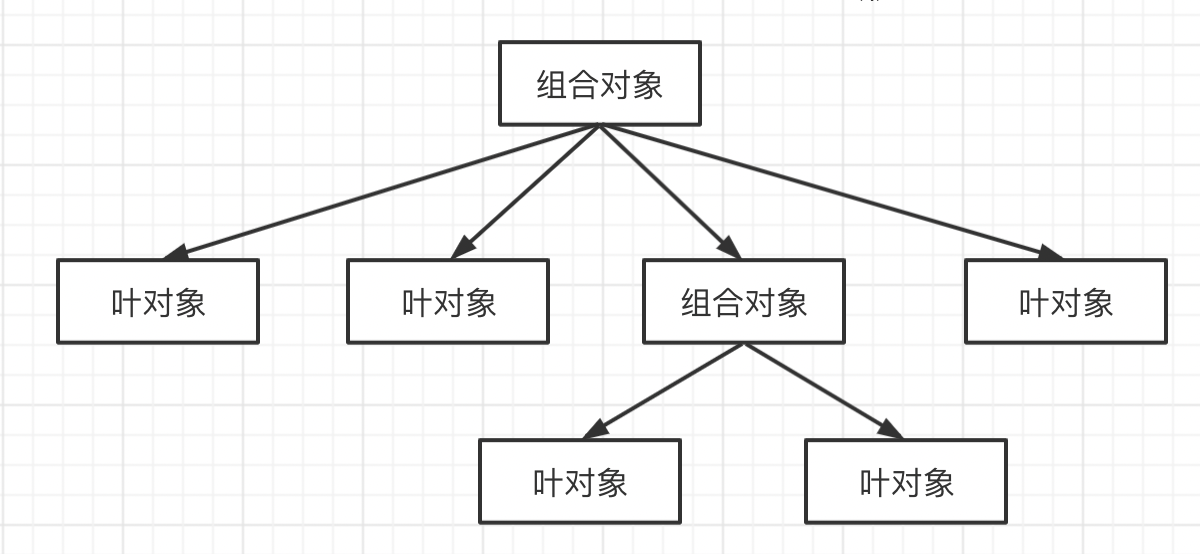
将对象组合成树形结构,表示 “整体-部分” 关系 通过对象的多态性表现,使得用户对单个对象和组合对象的使用具有一致性
-
让整体和部分都具有一致的操作方式
示例
请求在树中传递的过程
拿宏命令来说,请求从树最顶端向下传递。 如果当前处理请求是叶对象(普通子命令),叶对象自身会对请求作出相应的处理; 如果当前处理请求是组合对象(宏命令),组合对象会遍历它的子节点,继续传递请求。
肥宅快乐遥控器
假设 olu 下班回家开门后有如下操作:
- 开空调
- 开显示器和音响(插头接在同一个插板上的)
- 关门、开电脑、打开 VS Code
现在 olu 觉得如果有一个万能遥控器可以按一下就做到上述事项就美滋滋了。
class MacroCommand {  constructor() {    this.commandsList = []  }
  add(command) {    this.commandsList.push(command)  }
  execute() {    this.commandsList.forEach(x => {      x.execute()    })  }}
class OpenAcCommand {  execute() {    console.log(`打开空调~ 凉快哦`)  }}
class OpenScreenCommand {  execute() {    console.log(`打开显示器`)  }}
class OpenSoundCommand {  execute() {    console.log(`打开音响`)  }}
// 因为俩电器共用一个插板,所以用一个宏命令来组合打开显示器和打开音响的命令const macroCommand1 = new MacroCommand()macroCommand1.add(new OpenScreenCommand())macroCommand1.add(new OpenSoundCommand())
class closeDoorCommand {  execute() {    console.log(`关门关门~`)  }}
class openPcCommand {  execute() {    console.log(`开电脑~~~`)  }}
class openVSCodeCommand {  execute() {    console.log(`打开编辑器!`)  }}
const macroCommand2 = new MacroCommand()macroCommand2.add(new closeDoorCommand())macroCommand2.add(new openPcCommand())macroCommand2.add(new openVSCodeCommand())
// 把所有的命令组合成一个超级命令
const macroCommand = new MacroCommand()macroCommand.add(new OpenAcCommand())macroCommand.add(macroCommand1)macroCommand.add(macroCommand2)
macroCommand.execute()
扫描文件夹
文件和文件夹之间的关系比较适合用组合模式来描述,因为文件夹里既可以有文件也可以有文件夹,最终结果是组合成一棵树🌲,这样我们可以提出两个场景
- 我们选择部分文件或文件夹统一复制到某个目录下时,不需要考虑它的文件类型,只需要进行 Ctrl + C,Ctrl + V
- 我们用杀毒软件扫描文件夹时,一般不会关心里面有多少文件夹或文件,我们只需要操作最外层的文件夹进行扫描
// 文件夹class Folder {  constructor(name) {    this.name = name    this.parent = null    this.files = []  }
  add(file) {    if (this.files.includes(file)) {      throw new Error(`文件夹: ${this.name}已有重复`)    }
    file.parent = this    this.files.push(file)  }
  remove() {    if (!this.parent) {      return    }    const idx = this.parent.files.findIndex(file => file === this)    if (idx > -1) {      this.parent.files.splice(idx, 1)    }  }
  scan() {    console.log(`开始扫描文件夹:${this.name}`)    this.files.forEach(file => {      file.scan()    })  }}
// 文件class File {  constructor(name) {    this.name = name    this.parent = null  }
  add() {    throw new Error(`文件下无法添加文件哦`)  }
  remove() {    if (!this.parent) {      return    }    const idx = this.parent.files.findIndex(file => file === this)    if (idx > -1) {      this.parent.files.splice(idx, 1)    }  }
  scan() {    console.log(`开始扫描文件:${this.name}`)  }}
// 创建 文件夹-文件组合树const folder = new Folder('学习资料')const folder1 = new Folder('JavaScript')const folder2 = new Folder('CSS')const file1 = new File('JavaScript 高级程序设计')const file2 = new File('JavaScript 数据结构和算法')const file3 = new File('CSS 新世界')const file4 = new File('代码整洁之道')folder1.add(file1)folder1.add(file2)folder2.add(file3)folder.add(file4)folder.add(folder1)folder.add(folder2)
folder.scan()console.log(`删除 JavaScript 文件夹并再扫描一下`)folder1.remove()folder.scan()
应用场景
虚拟 DOM 中的 vnode (数据类型简单)
- 整体和单个节点的操作是一致的
- 整体和单个节点的数据结构也保持一致
<div id="div1" class="container"> <p>123</p> <p>456</p></div>const vnode = { tag: 'div', attr: { id: 'div1', className: 'container', }, children: [ { tag: 'p', attr: {}, children: ['123'] }, { tag: 'p', attr: {}, children: ['456'] } ]}设计原则验证
- 将整体和单个节点的操作抽象出来
- 符合开放封闭原则